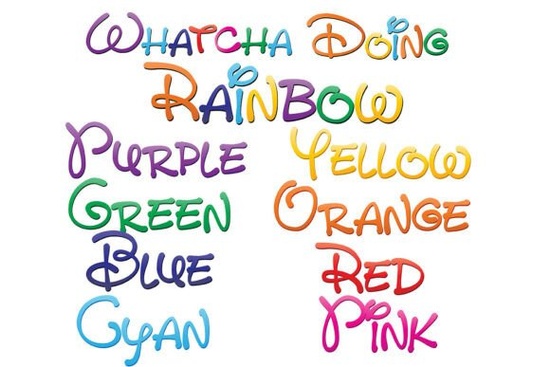
If you’ve been searching for a font that adds instant charm and color to your projects without needing extra design work, the Whatcha Doing Font might be exactly what you’re looking for. It’s not just one font it’s nine full-color SVG fonts, each with a playful, hand-written style that cycles through rainbow gradients. Whether you’re designing greeting cards, social media graphics, or print-on-demand products, this set gives you vibrant text right out of the box.
How do these colorful fonts actually work?
These are OpenType SVG fonts, which means they behave like regular .otf files when installing just double-click and add via Font Book on Mac or your Control Panel on Windows. But unlike standard fonts, they carry embedded color data. That’s why you’ll sometimes see them appear black in preview windows or older software. Don’t worry once you start typing in a compatible program, the colors will show up as intended.
Programs like Adobe Illustrator, Photoshop, Inkscape, Quark, and Silhouette Studio currently support full-color SVG fonts. If you’re unsure whether your software handles them, just type a few characters after selecting the font. If they pop into color, you’re good to go.
What can I make with Whatcha Doing Font?
This font family is especially handy if you want to skip manual coloring or layering effects. Here are a few real-world uses:
- Print-on-demand sellers can create eye-catching t-shirt slogans, tote bag quotes, or sticker packs without needing to vectorize or recolor text manually.
- Crafters using cutting machines (like Cricut or Silhouette) can design layered vinyl decals or iron-on transfers with built-in color variation.
- Small business owners can quickly whip up social media banners, email headers, or product labels that feel fun and personal.
- Hobbyists and journalers love using these fonts for digital planners, scrapbook titles, or printable wall art.
The ninth font in the pack the one that combines all eight rainbow gradients is especially useful for creating standout headlines or logos where you want maximum visual impact without extra editing.
Will these fonts slow down my workflow?
Not at all. Because they’re vector-based, you can scale them up or down without losing sharpness. That makes them ideal for everything from tiny stickers to large posters. And since the color is baked into the font file, you don’t need to spend time applying gradients, shadows, or overlays. Just type, pick your style, and you’re done.
One thing to note: if you’re exporting to formats like PNG or JPG for web use, make sure your software preserves the color data during export. Some older versions may flatten or desaturate unless you adjust settings.
Are there alternatives or similar fonts I should know about?
If you like the look of Whatcha Doing Font, you might also enjoy browsing other full-color script or hand-lettered fonts on Creative Fabrica. Many creators offer seasonal sets (think pastels for spring or metallics for holidays) that pair well with this style. The key is finding fonts labeled “SVG” or “color font” those are the ones that include built-in palettes.
You can explore more options by searching for Whatcha Doing Font directly on Creative Fabrica, where you’ll often find bundles or related add-ons like matching illustrations or pattern fills.
What if my software doesn’t support color fonts yet?
No problem. The fonts will still install and function they’ll just appear in black. You can always convert the text to outlines (in programs like Illustrator or Inkscape) and then manually apply your own gradients or colors afterward. It’s an extra step, but it gives you full control if you want to tweak the palette for branding purposes.
Alternatively, keep the font installed for future projects. As more design tools adopt SVG font support, you’ll be ready to use them without re-downloading or repurchasing.
Quick checklist before you start:
- ✅ Confirm your design software supports SVG/color fonts (Adobe, Inkscape, Silhouette Studio, etc.)
- ✅ Install all nine font files don’t skip the combined gradient version!
- ✅ Test by typing a word if it stays black, check compatibility or try converting to outlines
- ✅ Save your project in a format that preserves color layers (PDF/X-4, native .ai/.svg, etc.)
- ✅ For print-on-demand, verify your vendor accepts SVG or layered PDF uploads
Whether you’re adding flair to a birthday card or building a brand identity with personality, this colorful font set saves time and brings joy with minimal effort. Sometimes, the simplest tools make the biggest difference and this one’s as easy as typing a sentence.
Explore Design Hailey Font for Clean, Modern Designs
 Find Your Soulmate Font for Creative Projects
 Summer Chunky Fonts for Bold & Creative Designs
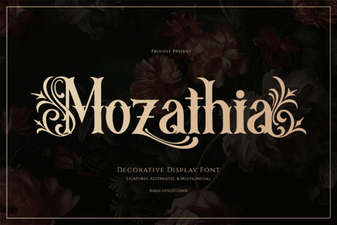 Mozathia Font: Design Creativity & Inspiration
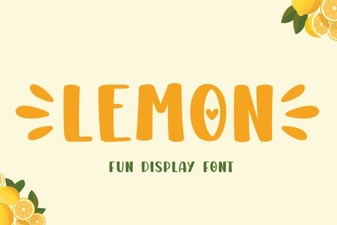 Lemon Font: Creative Uses in Modern Web Design
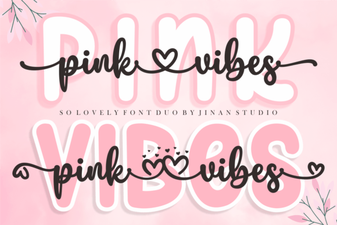 Pink Vibes Duo Font: Elegant Design & Creative Pairings